App Settings
To view your app settings and make changes, tap Menu from the bottom navigation. Review the settings and other details regularly. The most up-to-date information will provide the best experience in your usage of this app.
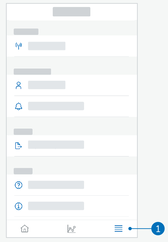
Edit Notification settings
- Tap Menu > Notification settings.
- Turn on or off the notification toggle as necessary.
- If you enable the notification for your weekly pattern summary, adjust the time if applicable.
- Tap Save.
Edit Account details
- Tap Menu > Account > Manage account.
- Add or update the necessary information. Tap Save.
Privacy settings
- Tap Menu > Account > Privacy settings.
Product info screen
- Tap Menu > Product info.
Sign out
- Tap Menu > Account > Sign out.
Delete account
- Tap Menu > Account > Delete my account.
Please ensure you want to take this action. If you delete your Accu-Chek Account, all data will be lost. Your data will not be retrievable at a later time. - Tap Done.