Navigation Elements
The following navigation elements are displayed in the upper part of the screen.
- Tap to return to the previous screen.
- Tap to close a screen.


The following navigation elements are displayed in the lower part of the screen.
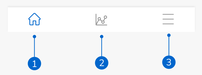
The icons are highlighted in blue to indicate the area of the app you are viewing.
- Home icon: Tap to access the Home screen.
- Patterns icon: Tap to access the Glucose patterns screen.
- Menu icon: Tap to display additional menu options. The options include Connections, Account, Notification settings, Export report, User's manual, Product info, and Contact us.